Gallery
Boards made with PCB Canvas and its auto-router. Each one is rendered straight from the board file by KiCad’s own command-line tool, and the numbers under it come from KiCad’s design-rule check on that same file. Nothing is touched up, and where a board is not finished the caption says so.
Bluetooth speaker board
A 2-layer rebuild of the board inside a cheap Bluetooth speaker: Jieli AC6969D audio chip, NS8002 amplifier, printed antenna, three LED channels. We placed two chips with Place All, then ran Auto-route all. The full guide shows every step.
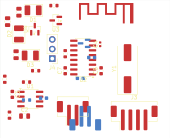
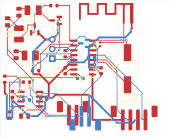
45.0 × 36.5 mm, 37 footprints, 256 track segments and 57 vias after routing (5 vias were placed with the parts). KiCad 10 design-rule check on the file: 0 errors, 25 warnings (lib-footprint mismatch, silkscreen overlap and silkscreen over copper). It has not been built or tested as a speaker; the board has no firmware, and the printed antenna is untuned. Source: our own board, built from the app’s catalogue parts, in the repository as Fixtures/Journeys/bt185-speaker-clone-routed.kicad_pcb.
Heltec-style LoRa board, part way through the auto-router
The four-layer ESP32-S3 + SX1262 board from the Heltec clone guide, captured at a point where the router had run but the board was not finished. Shown with only the outer layers; the inner ground and power planes are not drawn.
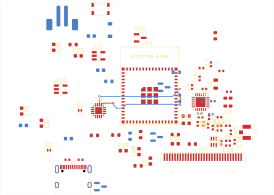
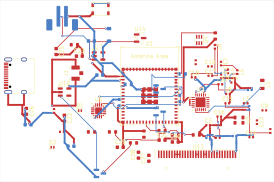
KiCad 10 design-rule check after refilling zones: 36 errors (32 track-width, 4 hole-clearance) and 42 warnings. This is a work-in-progress capture, not a finished or manufacturable board. Source: our own board, in the repository as Fixtures/Journeys/heltec-lora-v3-clone-routed.kicad_pcb. “Heltec” names the board it follows in spirit; PCB Canvas is not affiliated with Heltec.
How these were made
Each image is kicad-cli pcb export svg of the board file with F.Cu, B.Cu, F.Silkscreen and Edge.Cuts, no drawing sheet. Connection counts are kicad-cli pcb drc “unconnected items”, which can differ from the count the app shows on its own Auto-route sheet.